
.svg)
.svg)

Thanks to all those years of scrolling, you already intuitively know how to format articles for humans. Sprinkle in some bold font for key terms, maybe a neat list for instructions, and ta da, you’ve got a readable article. But you might not realize that you can also use meta tags to speak to search engines.
These behind-the-scenes elements are part of the HTML code, so they’re invisible to human readers. They help search engines understand what your content is all about — and preview it. That means more traffic and clicks.
Some meta tags have become outdated, but plenty are still helpful for search engine optimization (SEO). Here’s what you need to know about meta descriptions, viewport meta tags, and other common types of meta tags.
What Are Meta Tags?
Meta tags are hidden chunks of information in a page’s source code. They go in the <head> section of your HTML5 semantic markup, where search engines — but not humans — can easily read them.
For example, you can use <meta name=”description”> to summarize your content for algorithms. This text may also appear in the search results page, helping you entice readers. Writing about something explicit? Add <meta name="rating" content="adult"> so it gets filtered by SafeSearch.
Understanding how to write meta tags can help you get more clicks, even if they’re not direct ranking factors. A great meta description, for instance, can convince people to go beyond the AI overview and visit your site.
Why Do They Matter?
Search engine optimization meta tags might be invisible to the human eye, but they’re far from useless. These handy little snippets are part of the larger SEO puzzle.
Sure, they won’t directly bump you up the rankings, but they can influence how your content shows up in search results. You can also use viewport meta tags to make your site more mobile-friendly, which matters a lot to search engines.
Plus, they help get clicks. Most readers aren’t just mindlessly tapping the top search results. They’re skimming the title tags and meta descriptions to find the most helpful or attention-grabbing content. With great meta tags, you can still land traffic, even if you don’t land in the #1 slot.
If you don’t bother to write a meta description, you’re leaving it up to the search engines to choose an excerpt from your text. And that random snippet almost certainly won’t be as helpful or polished as a summary you wrote yourself.
Types of Meta Tags That Impact SEO
Not all meta tags are created equal, and some are as obsolete as a Nokia flip phone. Here’s which ones you should add to your on-page SEO toolkit and which ones you can skip.
Title Tags: The First Impression in Search Results
The title tag is the headline that appears in search engine results and the tab at the top of your browser. It’s separate from the H1 header that shows up on the page itself, and usually shorter.
For example, the title tag of this Later blog post is “How to Start a Podcast in 2024: Step-by-Step Guide,” but the H1 header is “5 Tips for Starting and Launching a Podcast.” Switching up your titles lets you add more relevant keywords, which search engines use for better query matching.
The best meta titles:
- Are between 50 and 60 characters
- Strike the right balance between catchy and descriptive
- Use your primary keywords, such as “start a podcast”
Meta Descriptions: Boost CTR With Strong Snippets
A meta description is a short piece of HTML code that sums up what your page is about. It’s the preview that shows up in search results under the title tag, like this:
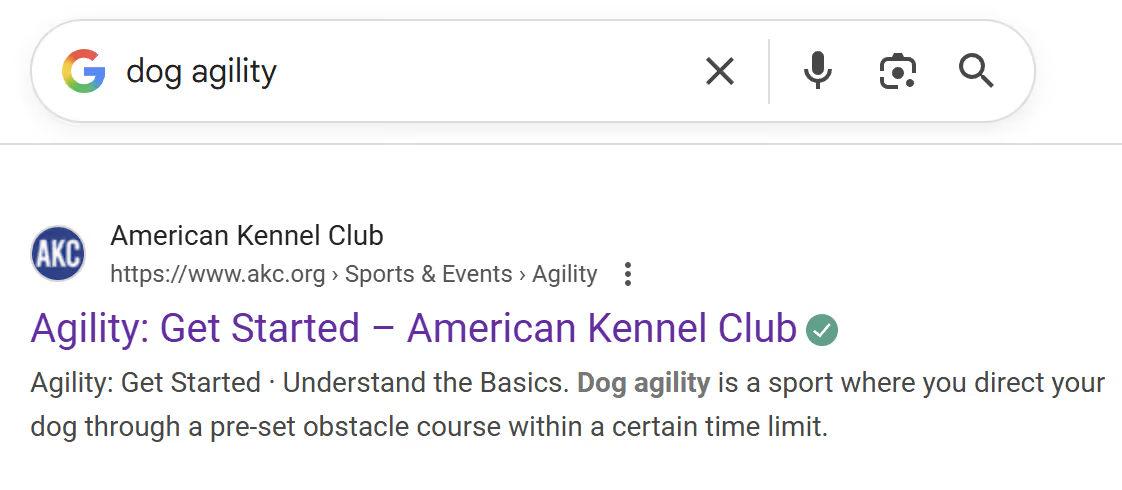
Sometimes, Google’s algorithm rewrites this description to fit the searcher’s query, but that doesn’t mean you shouldn’t bother creating one. You know your content best, and it’s helpful information that can boost the click-through rate.
Use these tips to write dazzling descriptions for your SEO content:
- Stick to around 150 characters so it doesn’t get cut off.
- Ask yourself, “Why would someone be searching for this topic?” and address this search intent. For example, if you’re writing a dog training article for sleep-deprived puppy owners, you might write, “Tired of listening to 3 a.m. howling? Learn how to get your new puppy to snooze all night long with easy enrichment games and crate training tips.”
- Include a call-to-action that shows your content’s value.
Robots Meta Tags: Controlling What Search Engines See
Some SEO metadata is strictly for search engine crawlers. These HTML tags tell the robots how to display — or not display — your content in the search results. In the source code, it looks like this:
<meta name="robots" content=" X ">
X stands for the command you give the crawlers.
Here are a few situations when you might use the meta robots attribute:
- Your product name looks strange in Spanish, so you use the “notranslate” command.
- You update your news page weekly and use ”noarchive” to stop Google from caching it.
- A big holiday sale ends on Christmas. With “unavailable_after,” you can tell Google Search to stop showing it after December 25.
Of course, the last thing you want to do is discourage search engines from indexing your pages. Use these meta tag codes sparingly.
Viewport Meta Tags: Making Sites Mobile-Friendly
The viewport is the visible area when you look at a site on a mobile device. It’s like peering through a window in an aquarium, except you can scroll when you want to see more fish — or words.
With SEO metadata tags, you can control how your site appears in this viewport instead of letting the device decide. For example, you can set the viewport width to “device-width” so your content automatically adapts to each user’s screen. For even more control, “initial-scale” lets you set the zoom level when the page loads.
Focus on accessibility when using these HTML tag attributes. People with visual impairments can’t read microscopic text, but no one wants an extreme close-up either. This handy viewport size chart from Adobe can help you strike the right balance.
Deprecated Meta Tags and What To Avoid
As algorithms get more complex, search engines have stopped using some SEO metadata tags. Here’s what you can safely avoid:
- Meta keywords: Instead of listing keywords in a meta tag code, sprinkle them naturally in the page content.
- Meta revisit-after: This was meant to tell crawlers how often to visit your site, but they work on their own schedules these days.
You should also avoid “stuffing” your metadata with keywords. For example, a word soup meta description like “Best Chicago pizza great Chicago pizza Chicago deep dish pizza pizza near me” will just turn off readers.
Alt Tags vs. Meta Tags: What’s the Difference?
While meta tags for SEO talk to search engines, alt tags are meant for screen readers. They describe what images look like, such as “Photo of a black and white T-shirt draped over a rocking chair."
How To Audit and Optimize Meta Tags Using SEO Tools
Search optimization takes a healthy amount of trial and error, and writing metadata is no exception. Use tools like Google Search Console and Screaming Frog to see how your custom meta tags are performing. They can help you track search traffic and spot common errors, such as duplicate meta descriptions or too-long title tags.
Use Meta Tags Strategically To Improve Search Performance
Adding custom meta tags only takes a few minutes, but it can go a long way to improving your site’s searchability. When you help your audience — human and robot — understand your content, it’s easier to get clicks.
Of course, there’s no replacement for quality content. Compose.ly’s expert SEO writers can help you create professional text with snappy title tags and meta descriptions.


